Running the Forgejo Runner in Kubernetes with a Docker-in-Docker Sidecar
Forgejo doesn't run CI jobs itself. A separate program, Forgejo Runner, asks the instance for jobs and runs each one in a container.
Forgejo's Docker installation guide sets it up with Docker Compose: a docker:dind daemon plus a runner container that talks to it. My cluster is k3s, managed by Argo CD from a public repo, so I translated that setup into one Kubernetes pod. A few details had to change along the way.
How the Compose Setup Maps to a Pod
| Docker Compose (Forgejo docs) | Kubernetes |
|---|---|
docker-in-docker service, privileged: 'true' |
dind sidecar, privileged: true |
dockerd -H tcp://0.0.0.0:2375 --tls=false |
Unix socket in a shared emptyDir |
depends_on the Docker service |
startupProbe running docker info |
runner-config.yml in ./data |
ConfigMap holding only the labels |
| UUID and token pasted into the config | UUID and token from a SealedSecret |
The real manifests are next to this README. In the repo they live in apps/forgejo-runner/manifests/, deployed by an Argo CD Application like every other app.
.
├── README.md
├── namespace.yaml     namespace labeled for privileged pods
├── configmap.yaml     runner labels
└── deployment.yaml    dind sidecar + runner
The Docker-in-Docker Sidecar
The Compose example serves the Docker API over TCP with TLS turned off. Copied into a pod, that becomes an unauthenticated Docker API on the pod's IP, reachable from every other pod in the cluster. The daemon is privileged, so that is effectively root on the node.
Instead, Docker listens only on a Unix socket in an emptyDir that both containers mount at /run/dind:
initContainers:
  - name: dind
    image: docker.io/library/docker:29.8.1-dind
    restartPolicy: Always
    args:
      - dockerd
      - --host=unix:///run/dind/docker.sock
      - --group=1000
    env:
      - name: DOCKER_HOST
        value: unix:///run/dind/docker.sock
    securityContext:
      privileged: true
    startupProbe:
      exec:
        command: ["docker", "info"]
      periodSeconds: 2
      failureThreshold: 30
Three details here are easy to miss:
restartPolicy: Alwaysturns the init container into a native sidecar (Kubernetes 1.29+). The runner starts only afterdocker infosucceeds and stops before Docker does, so no wait-for-the-daemon loop is needed.- The leading
dockerdmatters. When the first argument is a flag, the image's entrypoint adds its own listener ontcp://0.0.0.0:2376. Starting withdockerdskips that. --group=1000hands the socket to the runner, whose image runs as user and group1000.
Docker's storage, /var/lib/docker, gets its own emptyDir. It is wiped whenever the pod restarts, so images are downloaded again.
Docker-in-Docker can't run without privileged: true, and a job that escapes its container is effectively root on the node. I accept that because the runner only takes jobs from my own repositories, and jobs don't get the Docker socket (the runner's default).
Connecting Without a Registration Step
Runner v13 accepts its connection details as flags. That removes the forgejo-runner register step and its .runner file:
containers:
  - name: runner
    image: data.forgejo.org/forgejo/runner:13.2.0
    args:
      - forgejo-runner
      - daemon
      - --config=/etc/forgejo-runner/config.yml
      - --url=http://forgejo-http.forgejo.svc.cluster.local:3000/
      - --uuid=$(RUNNER_UUID)
      - --token-url=file:/run/secrets/forgejo-runner/token
    env:
      - name: DOCKER_HOST
        value: unix:///run/dind/docker.sock
      - name: RUNNER_UUID
        valueFrom:
          secretKeyRef:
            name: forgejo-runner-registration
            key: uuid
Kubernetes expands $(RUNNER_UUID) from the environment. The token is read from the Secret mounted as a file, so it never appears in the process list.
The connection must come from one place. If the config file also has a server.connections section, the runner refuses to start. So config.yml only sets the labels:
runner:
  labels:
    - docker:docker://data.forgejo.org/oci/node:24-trixie
    - ubuntu-latest:docker://data.forgejo.org/oci/node:24-trixie
The runner reaches Forgejo through the in-cluster Service. Jobs don't: actions/checkout clones from Forgejo's ROOT_URL, so its hostname must resolve from inside pods.
Setting It Up
Step 1: Create the Runner in Forgejo
Open Settings → Actions → Runners (/user/settings/actions/runners), click Create new runner, enter a name and click Create.
The next page shows a UUID and a Token. The token is shown only once. The Show registration token button belongs to the older forgejo-runner register flow and isn't needed.
Creating the runner under your user, not in site administration, limits it to jobs from your repositories.
Step 2: Seal the UUID and Token
Read the token without echoing it or saving it in shell history, then seal both values into one file:
read -rs RUNNER_TOKEN
kubectl create secret generic forgejo-runner-registration -n forgejo-runner \
  --from-literal=uuid=<uuid> \
  --from-literal=token="$RUNNER_TOKEN" \
  --dry-run=client -o yaml \
  | kubeseal --format yaml > apps/forgejo-runner/manifests/secrets/forgejo-runner-registration.yaml
unset RUNNER_TOKEN
Check that the file has token: and uuid: under encryptedData. If kubeseal fails, the redirect still leaves an empty file, and kubectl kustomize accepts an empty file without complaint.
Step 3: Deploy Through Argo CD
Add - forgejo-runner to apps/kustomization.yaml, check that it builds, then commit and push:
kubectl kustomize apps/forgejo-runner/manifests >/dev/null && echo OK
git add apps/forgejo-runner apps/kustomization.yaml
git commit -m "feat(forgejo-runner): add actions runner with docker-in-docker sidecar"
git push origin main
Step 4: Verify the Runner
Argo CD picks up the commit within about three minutes. The runner logs one line once it is connected:
kubectl -n forgejo-runner logs deploy/forgejo-runner -c runner | grep declaredtime="2026-09-23T14:56:19Z" level=info msg="runner: k3s-runner, with version: v13.2.0, with labels: [docker ubuntu-latest], ephemeral: false, declared successfully"The runner page then shows it as Idle. To try it, push a workflow to .forgejo/workflows/:
on: [push]
jobs:
  test:
    runs-on: docker
    steps:
      - uses: actions/checkout@v6
      - run: echo "runner works"
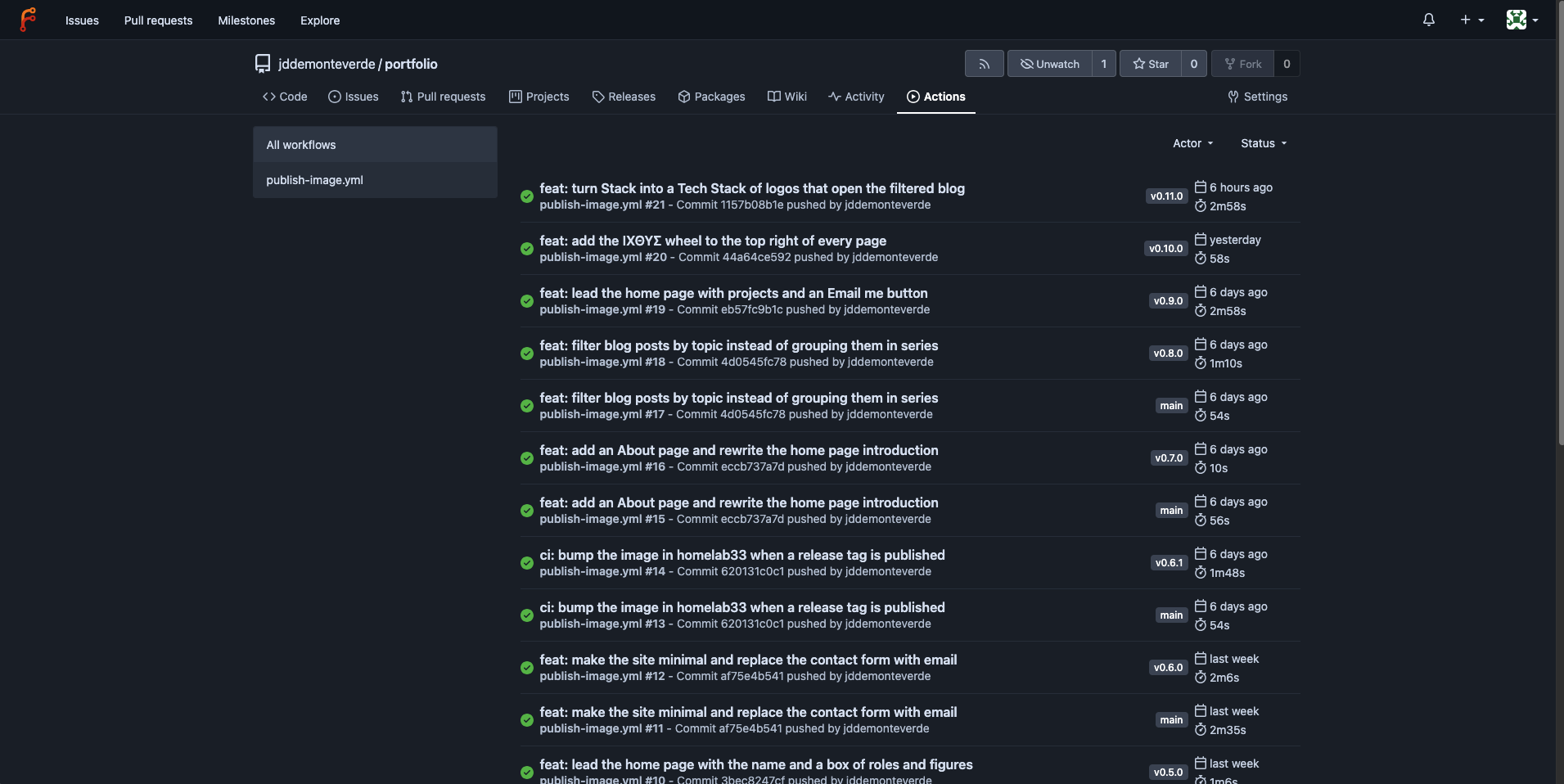
Each push then shows up as a run in the repository's Actions tab. These are my portfolio's builds, one for each push to main and one for each version tag:
Slow Pulls From data.forgejo.org
The first rollout took about 14 minutes. The 19.5 MB runner image took 13.5 minutes to download from data.forgejo.org, while the 135 MB docker:dind image came from Docker Hub in 15 seconds.
Argo CD marked the app Degraded when the Deployment passed its 10-minute progress deadline, then Healthy once the pull finished.
The 440 MB job image comes from the same host and is downloaded again after every pod restart. If that stays slow, docker.io/library/node:24-trixie has the same digest.
Conclusion
Forgejo's Compose example fits in one pod: Docker as a native sidecar on a Unix socket, and a runner that reads its UUID and token from a SealedSecret. After that, creating the runner in Forgejo's UI is the only manual step.
References
- Installation with Docker: the Compose setup this is based on
- Forgejo Runner Registration: where the UUID and token come from
- Utilizing Docker within Actions and Securing Forgejo Actions Deployments: the Docker-in-Docker trade-offs
- Runner Kubernetes example: the upstream manifest, which uses TLS over TCP and registers on every start
config.example.yamlfor v13.2.0: every runner option
Files
The configs from this post
The real files, with private values replaced by placeholders. Fill in your own before using them.