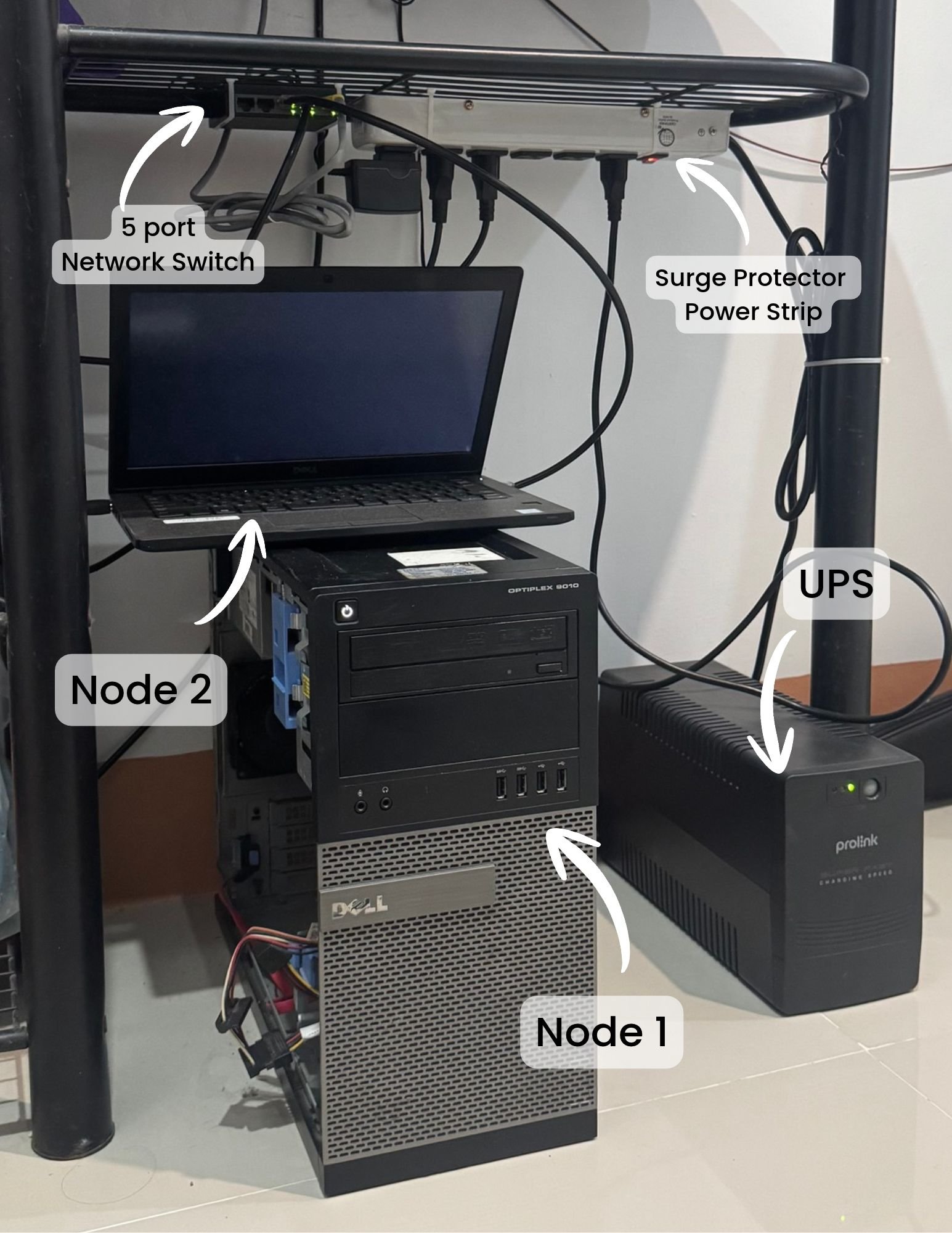
I had an old PC and a laptop collecting dust, so I turned them into a small Kubernetes cluster to host stuff like Forgejo and my portfolio site. This is how I set it up and, more importantly, why I made the choices I did. Writing it down so I don't forget and so I can redo it if I ever nuke the thing.
Full Kubernetes (kubeadm) is a lot of moving parts for two old machines. k3s is a single binary that bundles the API server, scheduler, kubelet, containerd, Flannel networking, CoreDNS and Traefik. It uses way less RAM, installs with one command, and is still real Kubernetes. Everything you'd learn on k3s carries over.
My first thought was "two machines, make them both control planes for redundancy." Turns out that's worse than one.
The cluster state lives in etcd, and etcd needs a majority of its members up to keep working. With 2 members, majority = 2, so if either machine reboots, the whole cluster's API goes down. With 1 server + 1 worker, only the server rebooting takes the API down. The worker rebooting just moves pods around.
Real HA starts at 3 control planes (survives losing 1). So for now: PC is the server, laptop is a worker. When I get a third machine, the laptop gets promoted and I'll have 3.
k3s defaults to SQLite as the datastore, which is fine for a single node but can't be shared with other control planes. Since I do plan to add a third node, I enabled embedded etcd from the start with --cluster-init. "Embedded" just means k3s runs etcd inside its own process; you don't install or manage it separately.
The cost is a bit more RAM and a lot of small disk writes. etcd hates spinning disks, but the PC has an SSD, so no problem. If it had been an HDD I'd have stuck with SQLite.
I actually installed without --cluster-init the first time. Re-running the installer with the flag added migrated SQLite to etcd automatically. More on that below.
Containers are throwaway. Anything that needs to survive a restart (Forgejo's git repos, its database) has to go on a persistent volume. k3s ships with local-path, which just uses a directory on the node's disk under /var/lib/rancher/k3s/storage/. Simple, fast, but the pod is tied to that node.
That's fine for now. When I get a NAS I'll add the nfs-subdir-external-provisioner chart so volumes live on the NAS and pods can move between nodes. Longhorn is overkill for two nodes.
sudo ufw allow from <lan-cidr> to any port 6443 proto tcp   # Kubernetes API
sudo ufw allow from <lan-cidr> to any port 10250 proto tcp  # kubelet (logs, exec, metrics)
sudo ufw allow from <lan-cidr> to any port 8472 proto udp   # Flannel VXLAN, pod traffic between nodes
sudo ufw allow from 10.42.0.0/16 to any                     # pod network
sudo ufw allow from 10.43.0.0/16 to any                     # service network
sudo ufw reload
10.42.0.0/16 and 10.43.0.0/16 are the k3s default pod and service CIDRs. Without these, pods can't talk to each other and kubectl logs breaks.
The other three ports only need the LAN, where the worker and my laptop are. A rule without from accepts any address, IPv6 included.
curl -sfL https://get.k3s.io | sh -s - server \
  --cluster-init \
  --node-ip <server-ip>
server: this node runs the control plane.
--cluster-init: use embedded etcd instead of SQLite (see above).
--node-ip: the machine has both an IPv4 and a public IPv6 address. Pinning it makes sure the cluster advertises the LAN IPv4 so other nodes join over that.
If you already installed without --cluster-init, just run the same command again with it added. The installer rewrites the systemd unit and restarts k3s, and k3s migrates the SQLite data into etcd on startup. Pass all your flags again because it replaces the unit file, it doesn't append. Takes about a minute of API downtime.
sudo systemctl status k3s --no-pager
kubectl get nodes -o wide
kubectl get pods -A
Node should be Ready with roles control-plane,etcd. All pods in kube-system (coredns, traefik, local-path-provisioner, metrics-server) should be Running after a minute or two.
kubectl, Helm, k9s etc. all look in ~/.kube/config by default.
k3s keeps the original readable only by root. It's a cluster-admin credential, so I copy it for my user rather than loosen it with --write-kubeconfig-mode.
sudo sed -i 's/^#\?HandleLidSwitch=.*/HandleLidSwitch=ignore/' /etc/systemd/logind.conf
sudo sed -i 's/^#\?HandleLidSwitchExternalPower=.*/HandleLidSwitchExternalPower=ignore/' /etc/systemd/logind.conf
sudo systemctl restart systemd-logind
Ubuntu suspends on lid close by default. A suspended node goes NotReady and Kubernetes starts evicting its pods after 5 minutes. This is the number one "why does my laptop node keep dropping" issue.
Also worth giving the laptop a DHCP reservation in the router so its IP doesn't change.
If active, open what's needed. No 6443 here, the worker doesn't run the API.
bash
sudo ufw allow from <lan-cidr> to any port 10250 proto tcp
sudo ufw allow from <lan-cidr> to any port 8472 proto udp
sudo ufw allow from 10.42.0.0/16 to any
sudo ufw allow from 10.43.0.0/16 to any
sudo ufw reload
ufw allow is safe to re-run. It skips rules that already exist.
curl -sfL https://get.k3s.io | \
  K3S_URL=https://<server-ip>:6443 \
  K3S_TOKEN=<token from the server> \
  sh -s - agent --node-ip <worker-ip>
Setting K3S_URL is what flips the installer into agent mode. It installs a k3s-agent service that only runs kubelet, containerd and Flannel. No API server, no etcd.
The laptop shows up Ready within about 30 seconds. Then check that pods on the worker can actually reach things on the server:
bash
kubectl run nettest --image=busybox --restart=Never \
  --overrides='{"spec":{"nodeName":"node-02"}}' -- sleep 300
kubectl exec nettest -- nslookup kubernetes.default
kubectl delete pod nettest
This forces a pod onto the laptop and has it resolve a service name through CoreDNS on the server. If it works, the VXLAN tunnel and service network are both fine. If it times out, check the 8472/udp rule first.
Third node. When it arrives, install it as a server pointed at the PC:bash
curl -sfL https://get.k3s.io | K3S_TOKEN=<token> sh -s - server \
  --server https://<server-ip>:6443
Then uninstall the agent on the laptop (sudo /usr/local/bin/k3s-agent-uninstall.sh) and reinstall it the same way. Three control planes, actual HA.
NAS + NFS storage for Forgejo and anything else with data I care about.
Exposing the portfolio site. Done: it's public now, through a Cloudflare Tunnel rather than port forwarding, so no port on the home network is open to the internet.