Moving Forgejo to an HTTPS Hostname Without Breaking Actions Checkouts
Most apps move to their new name with a one-line Ingress change. Forgejo needs more care, because it puts its own URL into everything it generates: clone URLs, redirects, and the context every Forgejo Actions job runs with.
The part that's easy to miss is CI. Jobs run in pods, pods aren't on my tailnet, and actions/checkout clones from Forgejo's own URL.
Placeholders: example.com is your domain, <proxy-ip> is the Tailscale proxy's address, and <old-hostname> is the name Forgejo used before. <owner> and <repo> are a repository's path on Forgejo.
Why CI breaks after the move
Forgejo passes its ROOT_URL to every Actions job as github.server_url, and actions/checkout clones from it. After the move, that's https://forgejo.lab.example.com.
Inside a job, the lookup goes through CoreDNS to public DNS and returns <proxy-ip>, the Tailscale address. A pod can't reach it, so the checkout times out.
The fix is to answer that one name differently inside the cluster.
Step 1: Serve both names
Add the new host next to the old one in Forgejo's Ingress, so nothing breaks while the rest changes. ingress.yaml has both rules.
Before going further, open https://forgejo.lab.example.com from a device on the tailnet and check the certificate is valid.
Step 2: Point the name at Traefik inside the cluster
k3s's CoreDNS imports extra rules from a ConfigMap called coredns-custom. One rewrite sends Forgejo's new name to Traefik's in-cluster Service:
apiVersion: v1
kind: ConfigMap
metadata:
  name: coredns-custom
  namespace: kube-system
data:
  forgejo.override: |
    rewrite stop {
      name exact forgejo.lab.example.com traefik.kube-system.svc.cluster.local
      answer auto
}- Pods now reach Traefik directly, and Traefik serves the same wildcard certificate. TLS verifies, because the URL still says
forgejo.lab.example.com. answer autoputs the original name back into the reply. Without it, the answer names the Traefik Service, and clients reject it.name exacttouches only this name. cert-manager's challenge records are unaffected, and cert-manager checks them against public resolvers anyway.
Only apps that pods call by their public name need a rewrite. For me that's just Forgejo.
Step 3: Change Forgejo's URLs
My Forgejo Deployment sets its URLs through environment variables:
- name: GITEA__server__DOMAIN
  value: forgejo.lab.example.com
- name: GITEA__server__ROOT_URL
  value: https://forgejo.lab.example.com/
- name: GITEA__server__SSH_DOMAIN
  value: forgejo.lab.example.com
Forgejo itself keeps serving plain HTTP inside the cluster. TLS ends at Traefik, and the https:// in ROOT_URL only changes the links Forgejo generates.
Clone over HTTPS. SSH isn't part of this series, because only ports 80 and 443 reach Traefik over the tailnet.
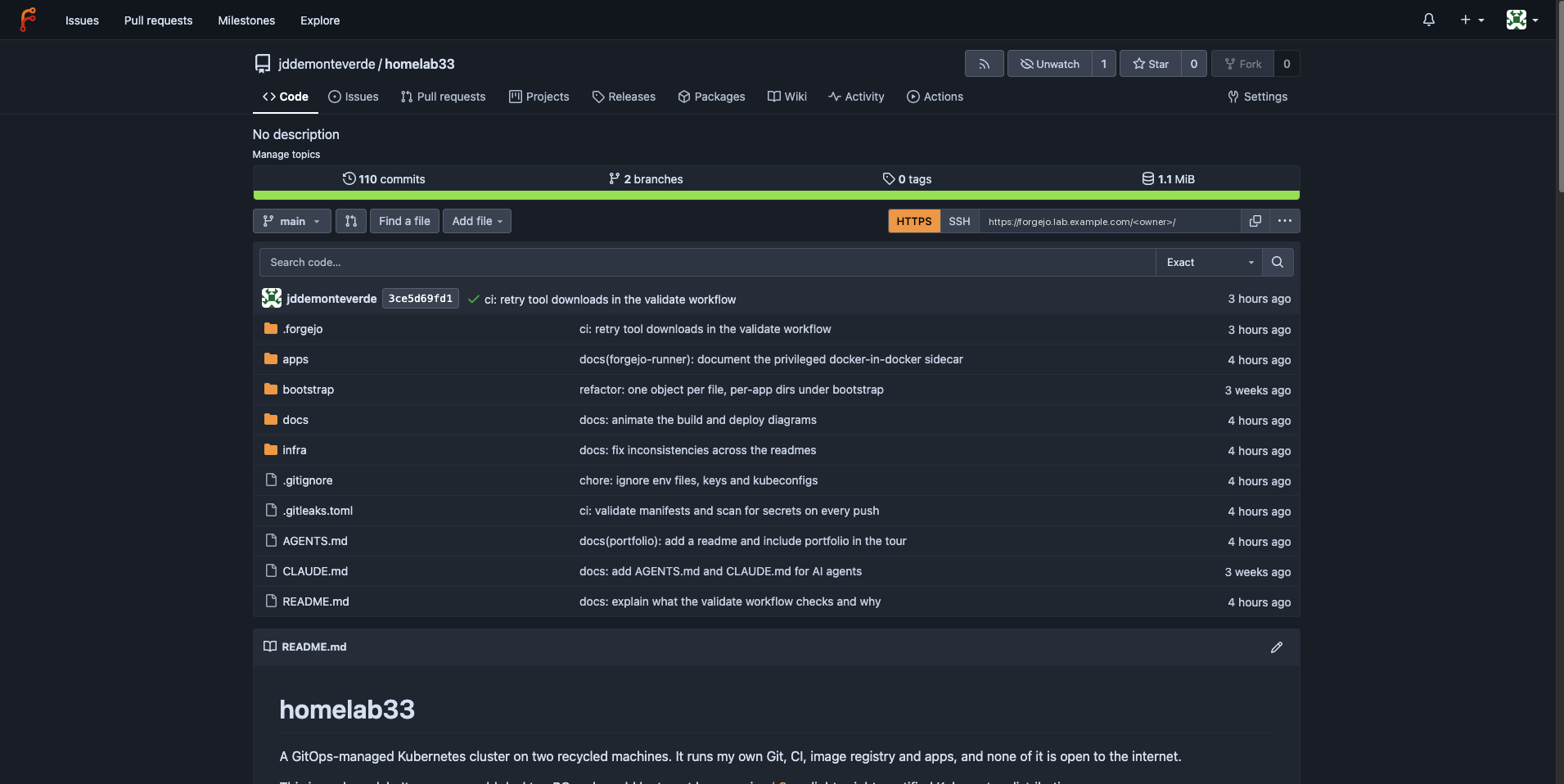
The clone URL on each repository page now uses the new name:
Then point existing clones at the new URL:
git remote set-url origin https://forgejo.lab.example.com/<owner>/<repo>.gitStep 4: Prove a checkout works
Push a commit to a repository that has a workflow, or re-run an existing run. A successful actions/checkout step means the CoreDNS rewrite, the certificate and the new ROOT_URL all line up.
The runner itself doesn't change. It talks to Forgejo through the in-cluster Service URL it registered with, not through ROOT_URL.
Step 5: Retire the old name
Once everything uses the new name:
- Remove the
<old-hostname>rule from the Ingress. - Remove its line from
/etc/hostson each device. - Turn on the HTTP-to-HTTPS redirect from the Traefik post.
After that, the tailnet can become the only way in: the Traefik post shows the one value that stops Traefik listening on the LAN.
Files
The configs from this post
The real files, with private values replaced by placeholders. Fill in your own before using them.